In SC-300, Azure AD Identity Protection is the prescribed control to "automatically detect and remediate externally leaked credentials." That specific user risk-Leaked credentials-relies on Microsoft comparing known breached username/password pairs with what Azure AD can evaluate. The study materials explain that Identity Protection "detects leaked credentials when Microsoft finds a match with the user's current credentials," and also note that password hash synchronization (PHS) can be enabled even if your sign-in method is Pass-through Authentication or federation. A common exam call-out is that without PHS, Azure AD has no hash to compare, so the leaked-credential signal is unavailable. Enabling PHS (you can keep PTA as the active sign-in method) allows Identity Protection to raise user risk and enforce policy actions such as require password change or block access. By contrast, Azure AD Password Protection addresses banned/weak passwords at change time, not breached-credential telemetry; federation choices (e.g., PingFederate) don't deliver the leaked-credential signal; and authentication method policy controls how users perform MFA (e.g., methods) rather than whether leaked credentials are detected. Therefore, to meet the requirement to
"automatically detect and remediate externally leaked credentials," the minimum correct step is to enable password hash synchronization while retaining PTA-exactly as recommended in SC-300 guidance.
Topic 1, Litware, IncOverview
Litware, Inc. is a pharmaceutical company that has a subsidiary named fabrikam, inc Litware has offices in Boston and Seattle, but has employees located across the United States. Employees connect remotely to either office by using a VPN connection.
Identity Environment
The network contains an Active Directory forest named litware.com that is linked to an Azure Active Directory (Azure AD) tenant named litware.com. Azure AD Connect uses pass-through authentication and has password hash synchronization disabled.
Litware.com contains a user named User1 who oversees all application development. Litware implements Azure AD Application Proxy.
Fabrikam has an Azure AD tenant named fabrikam.com. The users at Fabrikam access the resources in litware.
com by using gu est accounts in the litware.com tenant.
Cloud Environment
All the users at Litware have Microsoft 365 Enterprise E5 licenses. All the built-in anomaly detection polices in Microsoft Cloud App Security are enabled.
Litware has an Azure subscription associated to the litware.com Azure AD tenant. The subscription contains an Azure Sentinel instance that uses the Azure Active Directory connector and the Office 365 connector.
Azure Sentinel currently collects the Azure AD sign-ins logs and audit logs.
On-premises Environment
The on-premises network contains the severs shown in the following table.

Both Litware offices connect directly to the internet. Both offices connect to virtual networks in the Azure subscription by using a site-to-site VPN connection. All on-premises domain controllers are prevented from accessing the internet.
Delegation Requirements
Litware identifies the following delegation requirements:
* Delegate the management of privileged roles by using Azure AD Privileged Identity Management (PIM).
* Prevent nonprivileged users from registering applications in the litware.com Azure AD tenant-
* Use custom catalogs and custom programs for Identity Governance.
* Ensure that User1 can create enterprise applications in Azure AD. Use the principle of least privilege.
Licensing Requirements
Litware recently added a custom user attribute named LWLicenses to the litware.com Active Directory forest.
Litware wants to manage the assignment of Azure AD licenses by modifying the value of the LWLicenses attribute. Users who have the appropriate value for LWLicenses must be added automatically to Microsoft
365 group that he appropriate license assigned.
Management Requirement
Litware wants to create a group named LWGroup1 will contain all the Azure AD user accountsfor Litware but exclude all the Azure AD guest accounts.
Authentication Requirements
Litware identifies the following authentication requirements:
* Implement multi-factor authentication (MFA) for all Litware users.
* Exempt users from using MFA to authenticate to Azure AD from the Boston office of Litware.
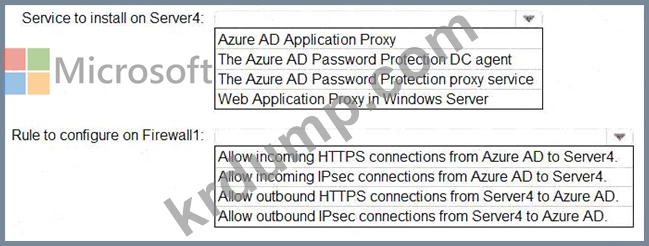
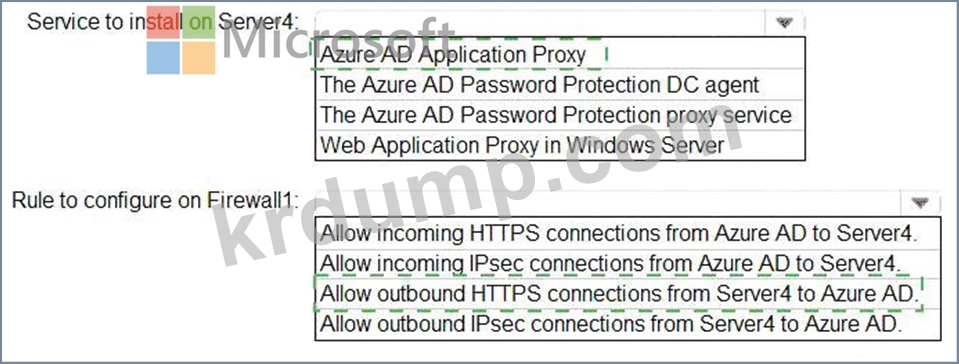
* Implement a banned password list for the litware.com forest.
* Enforce MFA when accessing on-premises applications.
* Automatically detect and remediate externally leaked credentials
Access Requirements
Litware wants to create a group named LWGroup1 that will contain all the Azure AD user accounts for Litware but exclude all the Azure AD guest accounts.
Monitoring Requirements
Litware wants to use the Fusion rule in Azure Sentinel to detect multi-staged that include a combination of suspicious Azure AD sign-ins followed by anomalous Microsoft Office 365 activity.