

SC-300-KR 문제 96
과제 10
Audit라는 이름의 그룹을 만들어야 합니다. 솔루션은 Audit 구성원이 보안 리더 역할을 활성화할 수 있도록 해야 합니다.
Audit라는 이름의 그룹을 만들어야 합니다. 솔루션은 Audit 구성원이 보안 리더 역할을 활성화할 수 있도록 해야 합니다.
정답:
See the Explanation for the complete step by step solution.
Explanation:
To create a group named "Audit" and ensure that its members can activate the Security Reader role, follow these steps:
Open the Microsoft Entra admin center:
Sign in with an account that has the Security Administrator or Global Administrator role.
Navigate to Groups:
Go toTeams & groups>Active teams and groups1.
Create the security group:
Select Add a security group.
On the Set up the basics page, enter "Audit" as the group name.
Add a description if necessary and chooseNext1.
Edit settings:
On theEdit settingspage, select whether you want Microsoft Entra roles to be assignable to this group and selectNext1.
Assign roles:
After creating the group, go to Roles > All roles.
Find and select the Security Reader role.
Under Assignments, choose Assign.
Select the "Audit" group to assign the role to its members2.
Review and finish:
Review the settings to ensure the "Audit" group is created with the ability for its members to activate the Security Reader role.
Finish the setup and save the changes.
By following these steps, you will have created the "Audit" group and enabled its members to activate the Security Reader role, which allows them to view security-related information without having permissions to change it. Remember to communicate the new group and role assignment to the relevant stakeholders in your organization.
Explanation:
To create a group named "Audit" and ensure that its members can activate the Security Reader role, follow these steps:
Open the Microsoft Entra admin center:
Sign in with an account that has the Security Administrator or Global Administrator role.
Navigate to Groups:
Go toTeams & groups>Active teams and groups1.
Create the security group:
Select Add a security group.
On the Set up the basics page, enter "Audit" as the group name.
Add a description if necessary and chooseNext1.
Edit settings:
On theEdit settingspage, select whether you want Microsoft Entra roles to be assignable to this group and selectNext1.
Assign roles:
After creating the group, go to Roles > All roles.
Find and select the Security Reader role.
Under Assignments, choose Assign.
Select the "Audit" group to assign the role to its members2.
Review and finish:
Review the settings to ensure the "Audit" group is created with the ability for its members to activate the Security Reader role.
Finish the setup and save the changes.
By following these steps, you will have created the "Audit" group and enabled its members to activate the Security Reader role, which allows them to view security-related information without having permissions to change it. Remember to communicate the new group and role assignment to the relevant stakeholders in your organization.
SC-300-KR 문제 97
Microsoft Entra 테넌트가 있습니다.
테넌트에 대한 위험한 사용자 활동을 쿼리해야 합니다.
위험한 사용자 활동 로그는 얼마나 오랫동안 보관됩니까?
테넌트에 대한 위험한 사용자 활동을 쿼리해야 합니다.
위험한 사용자 활동 로그는 얼마나 오랫동안 보관됩니까?
정답: C
According to the Microsoft Entra ID Protection section of the SC-300 Study Guide and the official Microsoft documentation on risk detections and retention , Microsoft Entra ID stores risky user activity and detections for 90 days . This includes logs of risky users, risky sign-ins, and risk detections identified by machine learning models and heuristic signals.
The retention period of 90 days ensures administrators can analyze user risk patterns, investigate compromised accounts, and implement mitigations such as Conditional Access or user risk policies. After 90 days, these logs are automatically purged unless exported to a SIEM such as Microsoft Sentinel for extended retention.
Microsoft Learn states:
"Identity Protection retains data for 90 days. Administrators can view risk detections, risky users, and risky sign-ins in the portal or query them using Microsoft Graph."
The retention period of 90 days ensures administrators can analyze user risk patterns, investigate compromised accounts, and implement mitigations such as Conditional Access or user risk policies. After 90 days, these logs are automatically purged unless exported to a SIEM such as Microsoft Sentinel for extended retention.
Microsoft Learn states:
"Identity Protection retains data for 90 days. Administrators can view risk detections, risky users, and risky sign-ins in the portal or query them using Microsoft Graph."
SC-300-KR 문제 98
온프레미스 네트워크에는 Microsoft Entra Connect를 사용하여 Microsoft Entra 테넌트와 동기화하는 Active Directory 도메인이 포함되어 있습니다.
다음 요구 사항을 충족하도록 Microsoft Entra Connect를 구성해야 합니다.
Microsoft Entra 로그인은 Active Directory 도메인 컨트롤러에서 인증되어야 합니다.
Active Directory 도메인 사용자는 Microsoft Entra 셀프 서비스 암호 재설정(SSPR)을 사용할 수 있어야 합니다.
행정적 노력을 최소화합니다.
각 요구 사항에 대해 무엇을 사용해야 할까요? 답변하려면 답변 영역에서 적절한 옵션을 선택하세요.

다음 요구 사항을 충족하도록 Microsoft Entra Connect를 구성해야 합니다.
Microsoft Entra 로그인은 Active Directory 도메인 컨트롤러에서 인증되어야 합니다.
Active Directory 도메인 사용자는 Microsoft Entra 셀프 서비스 암호 재설정(SSPR)을 사용할 수 있어야 합니다.
행정적 노력을 최소화합니다.
각 요구 사항에 대해 무엇을 사용해야 할까요? 답변하려면 답변 영역에서 적절한 옵션을 선택하세요.
정답:

Explanation:
Microsoft Entra sign-ins must be authenticated by an Active Directory domain controller: Pass-through authentication Active Directory domain users must be able to use Microsoft Entra self-service password reset (SSPR):
Password writeback
Let's break this down step by step based on Microsoft Entra Connect, authentication methods, and SSPR requirements, as outlined in Microsoft Identity and Access Administrator documentation.
Requirement 1: Microsoft Entra sign-ins must be authenticated by an Active Directory domain controller Understanding the Requirement:
The requirement states that Microsoft Entra sign-ins must be authenticated by an on-premises Active Directory domain controller. This means that the authentication process must occur on-premises rather than in the cloud.
Microsoft Entra Connect supports several authentication methods for hybrid identity:
Password Hash Synchronization (PHS):Password hashes are synchronized to Microsoft Entra ID, and authentication occurs in the cloud. This does not meet the requirement because the domain controller is not involved in the authentication process.
Pass-through Authentication (PTA):Users sign in to Microsoft Entra ID, but the authentication request is passed to an on-premises Active Directory domain controller for validation. This meets the requirement because the domain controller performs the authentication.
Federation with Active Directory Federation Services (AD FS):Users are redirected to an on-premises AD FS server, which authenticates them against the domain controller. This also meetsthe requirement because the domain controller is involved via AD FS.
Comparing the Options:
Federation with Active Directory Federation Services (AD FS):
AD FS provides federated authentication, where users are redirected to an on-premises AD FS server for authentication. The AD FS server communicates with the domain controller to validate credentials.
This meets the requirement because the domain controller authenticates the user.
However, AD FS requires significant infrastructure (e.g., AD FS servers, Web Application Proxy servers) and ongoing maintenance, which increases administrative effort.
Pass-through Authentication (PTA):
PTA allows Microsoft Entra ID to pass the authentication request directly to an on-premises domain controller via a lightweight agent installed on a server in the on-premises environment.
This meets the requirement because the domain controller performs the authentication.
PTA is simpler to deploy and manage than AD FS. It requires only the Microsoft Entra Connect server and the PTA agent, with no additional infrastructure like AD FS servers. This aligns with the requirement to " minimize administrative effort. " Minimizing Administrative Effort:
The question emphasizes minimizing administrative effort.
AD FS requires deploying and maintaining a federation infrastructure, including AD FS servers, Web Application Proxy servers, certificates, and load balancers. This involves significant administrative overhead.
PTA, on the other hand, is lightweight. It uses the existing Microsoft Entra Connect server and a small agent, with no additional infrastructure required. It also supports high availability by allowing multiple PTA agents.
Therefore, PTA is the better choice to minimize administrative effort while meeting the requirement.
Conclusion for Requirement 1:
Both options meet the requirement for domain controller authentication, but PTA is the better choice because it minimizes administrative effort.
The correct answer for this requirement isPass-through authentication.
Requirement 2: Active Directory domain users must be able to use Microsoft Entra self-service password reset (SSPR) Understanding the Requirement:
The requirement states that Active Directory domain users must be able to use Microsoft Entra self-service password reset (SSPR).
SSPR allows users to reset their passwords via a web portal (e.g., aka.ms/sspr) without contacting an administrator. In a hybrid environment (with Microsoft Entra Connect), SSPR must be configured to work with on-premises Active Directory accounts.
For SSPR to work in a hybrid environment, the password reset must be written back to the on-premises Active Directory so that the user's password is updated in both Microsoft Entra ID and Active Directory.
Understanding the Options:
Device writeback:
Device writeback synchronizes device objects (e.g., for Conditional Access or Windows Hello for Business) between Microsoft Entra ID and Active Directory.
This is unrelated to SSPR or password management.
Group writeback:
Group writeback synchronizes Microsoft 365 groups from Microsoft Entra ID to Active Directory, allowing on-premises applications to use these groups.
This is also unrelated to SSPR or password management.
Password hash synchronization:
Password hash synchronization (PHS) synchronizes the hash of a user's Active Directory password to Microsoft Entra ID, enabling cloud authentication.
While PHS is often used in hybrid environments, it only synchronizes passwords from Active Directory to Microsoft Entra ID (one-way). It does not support writing password changes (e.g., from SSPR) back to Active Directory, which is required for SSPR in a hybrid environment.
Password writeback:
Password writeback is a feature of Microsoft Entra Connect that allows password changes made in Microsoft Entra ID (e.g., via SSPR) to be written back to the on-premises Active Directory.
This is specifically designed for SSPR in hybrid environments. When a user resets their password using SSPR, the new password is written back to Active Directory, ensuring the user's credentials are consistent across both environments.
Password writeback requires Microsoft Entra ID P1 or P2 licenses and must be enabled in Microsoft Entra Connect.
SSPR in a Hybrid Environment:
For SSPR to work for Active Directory domain users, password writeback must be enabled. Without password writeback, a password reset in Microsoft Entra ID would not update the on-premises Active Directory, rendering the user unable to sign in to on-premises resources.
Password writeback ensures that when a user resets their password via SSPR, the new password is synchronized to Active Directory, meeting the requirement.
Conclusion for Requirement 2:
The only option that enables SSPR for Active Directory domain users in a hybrid environment isPassword writeback.
The other options (Device writeback, Group writeback, Password hash synchronization) do not support writing password changes back to Active Directory, which is necessary for SSPR.
Final Answer Summary:
Microsoft Entra sign-ins must be authenticated by an Active Directory domain controller:Pass-through authentication (meets the requirement and minimizes administrative effort compared toAD FS).
Active Directory domain users must be able to use Microsoft Entra self-service password reset (SSPR):
Password writeback (required for SSPR in a hybrid environment).
References:
Microsoft Entra Connect documentation: " Choose the right authentication method " (Microsoft Learn:
https://learn.microsoft.com/en-us/entra/identity/hybrid/connect/choose-ad-authn) Microsoft Entra Connect documentation: " Password writeback for SSPR " (Microsoft Learn:https://learn.
microsoft.com/en-us/entra/identity/authentication/howto-sspr-writeback) Microsoft Identity and Access Administrator (SC-300) exam study guide, which covers Microsoft Entra Connect authentication methods and SSPR configuration in hybrid environments.
SC-300-KR 문제 99
Microsoft Entra 테넌트가 있습니다.
특정 외부 도메인의 사용자만 테넌트에 게스트로 초대될 수 있도록 해야 합니다.
어떤 설정을 구성해야 합니까?
특정 외부 도메인의 사용자만 테넌트에 게스트로 초대될 수 있도록 해야 합니다.
어떤 설정을 구성해야 합니까?
정답: B
According to the Microsoft Entra External Identities module within the SC-300 curriculum, control over which external domains can be invited as guest users is managed under External collaboration settings in the Entra admin center.
Administrators can specify "Allow invitations only to the specified domains" and list approved domains.
This ensures that guest invitations can only be sent to trusted business partners while blocking all others.
Cross-tenant access settings control authentication and access policies between trusted tenants, not invitation restrictions. Linked subscriptions and identity providers manage billing and authentication federation but do not control guest invitations.
Therefore, to restrict guest invitations to specific external domains, you must configure the External collaboration settings in Microsoft Entra ID.
Administrators can specify "Allow invitations only to the specified domains" and list approved domains.
This ensures that guest invitations can only be sent to trusted business partners while blocking all others.
Cross-tenant access settings control authentication and access policies between trusted tenants, not invitation restrictions. Linked subscriptions and identity providers manage billing and authentication federation but do not control guest invitations.
Therefore, to restrict guest invitations to specific external domains, you must configure the External collaboration settings in Microsoft Entra ID.
SC-300-KR 문제 100
다음 표에 표시된 리소스가 포함된 Azure 구독이 있습니다.
Vault1에 대한 액세스를 구성해야 합니다. 솔루션은 다음 요구 사항을 충족해야 합니다.
* User1이 Vault1에서 키를 관리하고 생성할 수 있는지 확인합니다.
* User2가 Vault1에 저장된 인증서에 액세스할 수 있는지 확인합니다.
* 최소 권한의 원칙을 사용하세요.
각 사용자에게 어떤 역할을 할당해야 할까요? 답변 영역에서 적절한 옵션을 선택하여 답변하세요.
참고: 정답 하나당 1점입니다.
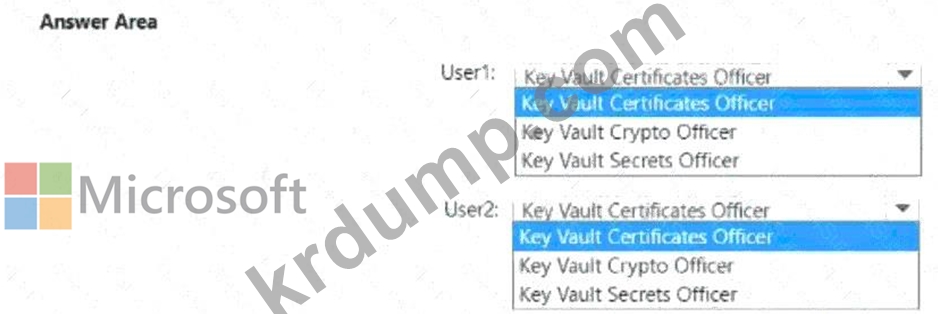
Vault1에 대한 액세스를 구성해야 합니다. 솔루션은 다음 요구 사항을 충족해야 합니다.
* User1이 Vault1에서 키를 관리하고 생성할 수 있는지 확인합니다.
* User2가 Vault1에 저장된 인증서에 액세스할 수 있는지 확인합니다.
* 최소 권한의 원칙을 사용하세요.
각 사용자에게 어떤 역할을 할당해야 할까요? 답변 영역에서 적절한 옵션을 선택하여 답변하세요.
참고: 정답 하나당 1점입니다.
정답:

Explanation:
User1: Key Vault Crypto Officer
User2: Key Vault Certificates Officer
As detailed in Microsoft documentation and the Exam Ref SC-300: Microsoft Identity and Access Administrator , Azure Key Vault provides role-based access control (RBAC) to manage keys, secrets, and certificates independently. The built-in roles are designed with the principle of least privilege - granting users only the permissions necessary to perform their tasks.
According to the Microsoft Learn module "Manage access to Key Vault using Azure RBAC" , the relevant built-in roles are:
* Key Vault Crypto Officer - This role allows users to manage cryptographic keys in a key vault.
Specifically, the Crypto Officer can create, import, delete, and manage keys , as well as perform cryptographic operations such as encrypt, decrypt, sign, and verify. This aligns perfectly with the requirement that User1 must manage and create keys in Vault1.
* Key Vault Certificates Officer - This role allows a user to manage and retrieve certificates within a key vault. It provides access to read, import, and delete certificates but not to manage or create keys or secrets. This satisfies the requirement that User2 must access a certificate stored in Vault1.
The Exam Ref SC-300 emphasizes that the least privilege principle requires assigning users the lowest possible role that meets their operational needs. Therefore, assigning Key Vault Crypto Officer to User1 and Key Vault Certificates Officer to User2 ensures compliance, minimal access exposure, and operational
- 다른 버전
- 446Microsoft.SC-300-KR.v2026-08-29.q204
- 1189Microsoft.SC-300-KR.v2026-06-08.q173
- 1882Microsoft.SC-300-KR.v2026-04-21.q141
- 1434Microsoft.SC-300-KR.v2026-03-16.q211
- 1153Microsoft.SC-300-KR.v2026-03-03.q165
- 1286Microsoft.SC-300-KR.v2025-11-24.q159
- 1151Microsoft.SC-300-KR.v2025-02-28.q117
- 최근 업로드
- 134Oracle.1Z1-171.v2026-09-06.q38
- 151SAP.C_S4TM.v2026-09-06.q71
- 160Oracle.1Z0-1054-26.v2026-09-06.q65
- 191Huawei.H12-831_V1.0.v2026-09-06.q231
- 134Salesforce.Plat-Arch-205.v2026-09-06.q28
- 151Salesforce.Plat-Arch-203.v2026-09-06.q90
- 142Oracle.1Z0-1050-26.v2026-09-05.q19
- 214Salesforce.Manufacturing-Cloud-Professional.v2026-09-05.q111
- 231EXIN.ITILFND_V4.v2026-09-05.q129
- 251Citrix.1Y0-312.v2026-09-05.q182
[×]
PDF 파일 다운로드
메일 주소를 입력하시고 다운로드 하세요. Microsoft.SC-300-KR.v2026-06-03.q151 모의시험 시험자료를 다운 받으세요.