

AZ-104-KR 문제 171
Scope1이 기술적 요구 사항을 충족하는지 확인해야 합니다.
Scope1을 사용하여 무엇을 암호화할 수 있나요?
In the given scenario:
* storage1 has Hierarchical namespace = Yes (Data Lake Storage Gen2 enabled).
* storage2 has Hierarchical namespace = No.
* The plan was to create an encryption scope named Scope1 in storage2.
* The technical requirement specifies that Scope1 must be used to encrypt storage services.
According to the Azure Administrator documentation on encryption scopes:
"Encryption scopes are supported for block blobs, append blobs, page blobs, Azure Files, queues, and tables in standard StorageV2 accounts. Encryption scopes are not supported in hierarchical namespace (Data Lake Gen2) enabled accounts." This means that Scope1-created in storage2, which does not have hierarchical namespace-can encrypt all blob data (containers and blobs) as well as file shares, queues, and tables.
However, storage1 cannot use encryption scopes because hierarchical namespace storage accounts (ADLS Gen2) manage encryption at the account level and do not support per-scope encryption.
Therefore, only storage2 can apply Scope1, and it can encrypt containers, blobs, file shares, queues, and tables.
Topic 2, Contoso LtdOverview
Contoso, Ltd. is a manufacturing company that has offices worldwide. Contoso works with partner organizations to bring products to market.
Contoso products are manufactured by using blueprint files that the company authors and maintains.
Existing Environment
Currently, Contoso uses multiple types of servers for business operations, including the following:
File servers
Domain controllers
Microsoft SQL Server servers
Your network contains an Active Directory forest named contoso.com. All servers and client computers are joined to Active Directory.
You have a public-facing application named App1. App1 is comprised of the following three tiers:
A SQL database
A web front end
A processing middle tier
Each tier is comprised of five virtual machines. Users access the web front end by using HTTPS only.
Requirements
Planned Changes
Contoso plans to implement the following changes to the infrastructure:
Move all the tiers of App1 to Azure.
Move the existing product blueprint files to Azure Blob storage.
Create a hybrid directory to support an upcoming Microsoft Office 365 migration project.
Technical Requirements
Contoso must meet the following technical requirements:
Move all the virtual machines for App1 to Azure.
Minimize the number of open ports between the App1 tiers.
Ensure that all the virtual machines for App1 are protected by backups.
Copy the blueprint files to Azure over the Internet.
Ensure that the blueprint files are stored in the archive storage tier.
Ensure that partner access to the blueprint files is secured and temporary.
Prevent user passwords or hashes of passwords from being stored in Azure.
Use unmanaged standard storage for the hard disks of the virtual machines.
Ensure that when users join devices to Azure Active Directory (Azure AD), the users use a mobile phone to verify their identity.
Minimize administrative effort whenever possible.
User Requirements
Contoso identifies the following requirements for users:
Ensure that only users who are part of a group named Pilot can join devices to Azure AD.
Designate a new user named Admin1 as the service administrator of the Azure subscription.
Admin1 must receive email alerts regarding service outages.
Ensure that a new user named User3 can create network objects for the Azure subscription.
AZ-104-KR 문제 172
In this scenario:
You are required to grant Group4 read-only access using Azure RBAC on Azure file shares.
The technical requirement specifies:
"Whenever possible, grant Group4 Azure RBAC read-only permissions to the Azure file shares." From the case study data:
Storage Account
Kind
Identity-based Access
storage1
Storage (general purpose v1)
Azure AD DS
storage2
StorageV2
Disabled
storage3
BlobStorage
N/A
storage4
FileStorage
Azure AD DS
The Storage (general purpose v1) type (storage1) does not support Azure AD or Azure RBAC integration for file shares. Microsoft documentation clearly states that "StorageV1 accounts must be upgraded to StorageV2 to support Azure AD authentication and RBAC role assignments." Meanwhile, FileStorage (storage4) already supports Azure AD Domain Services (Azure AD DS) and RBAC role assignment; hence no further modification is required there. However, to make storage1 compatible, it must be converted from StorageV1 to StorageV2.
Once converted to StorageV2, you can then:
Enable identity-based access for Azure file shares.
Assign Azure RBAC roles (e.g., Storage File Data Reader) to Group4.
Microsoft-Documented Requirements Summary:
Supported Account Types: StorageV2 or FileStorage
Unsupported: StorageV1 and BlobStorage
Required RBAC Roles for Read-Only Access:
Storage File Data Reader (or custom read-only role)
Thus, to meet the organization's requirement to provide Azure RBAC read-only permissions, you must change the account type of storage1 to StorageV2, ensuring both storage1 and storage4 can be managed with Azure RBAC.
AZ-104-KR 문제 173
이 섹션의 질문에 답변한 후에는 해당 섹션으로 돌아갈 수 없습니다. 따라서 해당 질문은 복습 화면에 표시되지 않습니다.
다음 표에 표시된 가상 머신이 포함된 Azure 구독이 있습니다.
다음 구성을 갖는 로드 밸런서를 배포합니다.
*이름: LB1
*유형: 내부
*SKU: 표준
*가상 네트워크: VNET1
LB1의 백엔드 풀에 VM1과 VM2를 추가할 수 있는지 확인해야 합니다.
해결 방법: 두 개의 표준 공용 IP 주소를 만들고 표준 SKU 공용 IP 주소를 각 가상 머신의 네트워크 인터페이스에 연결합니다.
이것이 목표를 달성하는가?
# Scenario Summary
You have:
VM1 and VM2 in the same VNet (VNET1)
A Load Balancer (LB1) configured as:
Type: Internal
SKU: Standard
You need to ensure that VM1 and VM2 can be added to LB1's backend pool.
The proposed solution:
" You create two Standard public IP addresses and associate a Standard SKU public IP address to the network interface of each virtual machine. "
# Understanding Azure Load Balancer Requirements
1. Backend pool requirements for a Standard Load Balancer:
All VMs must be in the same virtual network as the load balancer.
Each VM's NIC must be configured with a Standard SKU IP configuration (private or public).
The Load Balancer SKU must match the SKU of the IP addresses associated with the VM network interfaces.
2. Internal Load Balancer behavior:
An Internal Load Balancer (ILB) distributes traffic within a virtual network using private IP addresses, not public IPs.
Therefore, the backend VMs do not need public IPs - and adding them does not affect backend pool membership.
3. SKU alignment rule (Microsoft Docs):
"You can only attach virtual machines or instances that use Standard IP configurations to a Standard Load Balancer. Basic and Standard SKUs are not interchangeable." However:
A public IP is only required for inbound Internet access or outbound NAT, not for internal load balancing.
For an Internal Standard Load Balancer, backend pool members require Standard SKU NIC configurations, not public IPs.
# Why the Proposed Solution Fails
The solution suggests creating two Standard public IPs and assigning them to the VMs' NICs.
This does not enable VM1 and VM2 to join the backend pool of an internal load balancer, because:
The load balancer type is internal, meaning it routes private traffic within the virtual network, not via public IPs.
Backend pool membership depends on the NIC's private IP configuration, not its public IP.
Adding public IPs only exposes VMs to the Internet and does not influence load balancer backend eligibility.
Thus, this action is unnecessary and does not meet the goal.
# Correct Solution (for reference)
To meet the goal:
Ensure VM1 and VM2 have NICs configured with Standard SKU private IPs.
Ensure both VMs are in VNet1, the same virtual network as LB1.
No need to assign public IPs to internal backend VMs.
You could also ensure:
az network nic ip-config update \
--name ipconfig1 \
--nic-name VM1-nic \
--resource-group RG1 \
--private-ip-address-version IPv4 \
--sku Standard
# Final Verified Answer:
B). No
# Microsoft Azure Documentation (Exam-Verified Extracts)
Azure Load Balancer SKU Comparison:
"Internal Load Balancer uses private IP addresses. Public IPs are not required or used for internal balancing." Backend Pool Membership:
"Virtual machines in the backend pool must be in the same virtual network as the load balancer and use matching Standard SKU IP configurations." Public vs Internal Load Balancer:
"For internal load balancers, only private frontends and backend configurations are supported."
# Final Verified Answer: B. No
Assigning Standard public IPs to VMs does not affect internal load balancer backend connectivity. Backend membership depends on private IP configurations in the same VNet and matching SKU, not public IPs.
AZ-104-KR 문제 174

User1에게는 저장소 1에 대한 다음 역할이 할당됩니다.
* 스토리지 Blob 데이터 리더
* 저장 테이블 데이터 기여자
* 저장 파일 데이터 SMB 공유 기여자
storage1의 경우, 다음 그림과 같은 설정을 갖는 SAS1이라는 이름의 공유 액세스 서명(SAS)을 생성합니다. ('그림' 탭을 클릭하세요.)

User1은 SAS1과 key1을 사용하여 어떤 리소스에 쓸 수 있나요? 답하려면 답변 영역에서 적절한 옵션을 선택하세요.


Explanation:

In this scenario, the Azure subscription contains a storage account (storage1) with three resources:
container1 (Blob container)
folder1 (File share)
Table1 (Table storage)
User1's assigned roles:
Storage Blob Data Reader # Read-only access to Blob data (cannot write).
Storage Table Data Contributor # Read, write, and delete access to Table data.
Storage File Data SMB Share Contributor # Read and write access to Azure File shares.
Now, let ' s analyze access using key1 and SAS1.
1## Access via key1
When using an account key, access is granted to all services within the storage account-Blob, File, Queue, and Table, because the key authenticates at the account level.
However, the question specifically asks:
"To which resources can User1 write by using SAS1 and key1?"
While account keys grant access to all resources, write permissions depend on the assigned roles of User1 for that account.
User1 can:
Write to the File share (folder1) because they are a Storage File Data SMB Share Contributor.
Write to the Table (Table1) because they are a Storage Table Data Contributor.
Cannot write to the Blob container (container1) because they only have the Storage Blob Data Reader role, which is read-only.
# Therefore, using key1, User1 can write to folder1 and Table1 only.
2## Access via SAS1
The Shared Access Signature (SAS) shown in the exhibit specifies:
Allowed services: Blob, File, and Table (Queue not selected).
Allowed permissions: Read, Write, Delete, List, Add, Create, and Update.
Start and expiry: Valid from 2022 to 2030.
Protocols: HTTPS only.
SAS defines data plane access, allowing specific operations within the defined services, regardless of the user' s assigned Azure roles.
Therefore, the SAS allows:
Access to Blob service # affects container1
Access to File service # affects folder1
Access to Table service # affects Table1
However, the question specifically distinguishes SAS1 and key1. Because SAS1 defines services explicitly, the question's options match how Azure limits SAS to only those selected services.
Hence, SAS1 allows write access to:
Table1 (Table service)
container1 (Blob service)
# Therefore, using SAS1, User1 can write to Table1 and container1 only.
# Final Verified Answer:
Access Method
Write Access To
key1
folder1 and Table1 only
SAS1
Table1 and container1 only
Reference Extract (Azure Documentation):
"A shared access signature (SAS) grants limited access rights to Azure Storage resources for a specified time and set of permissions. The permissions are defined per service selected (Blob, File, Queue, Table)."
"Using an account key provides full access to all data objects in the storage account, but effective access may still be limited by assigned RBAC roles if role-based access control is enforced."
AZ-104-KR 문제 175
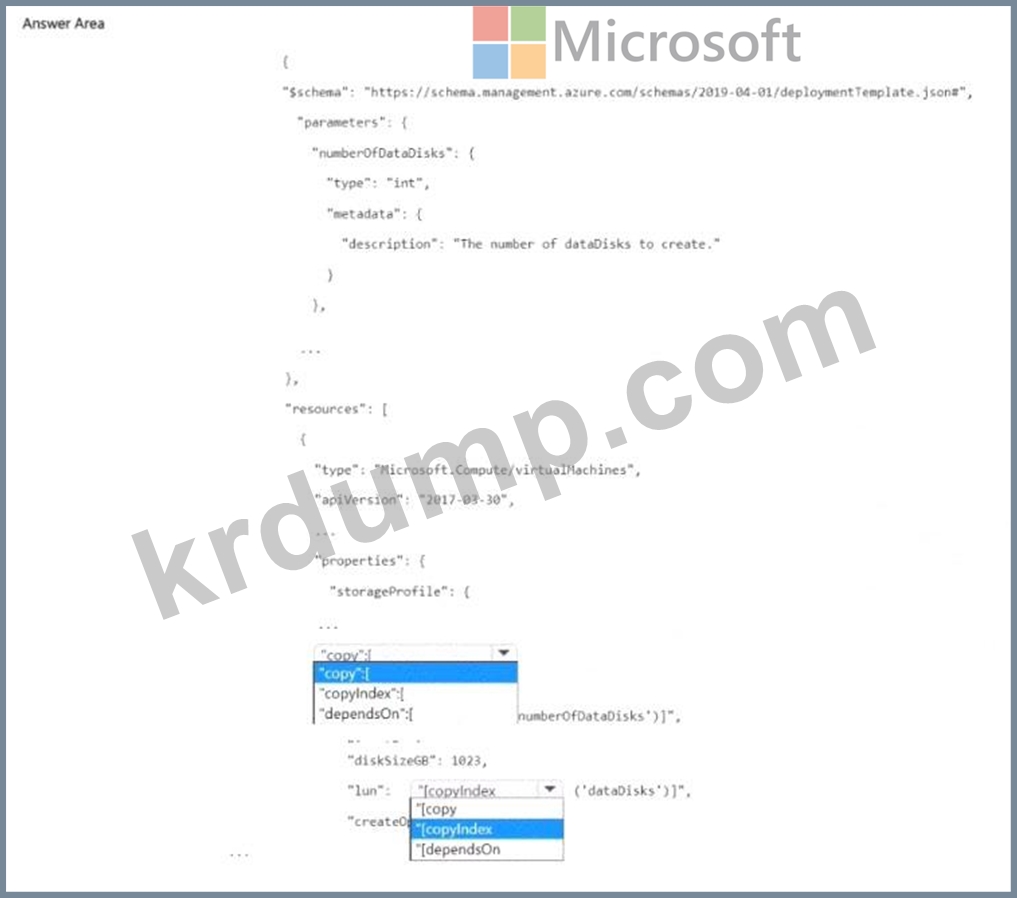
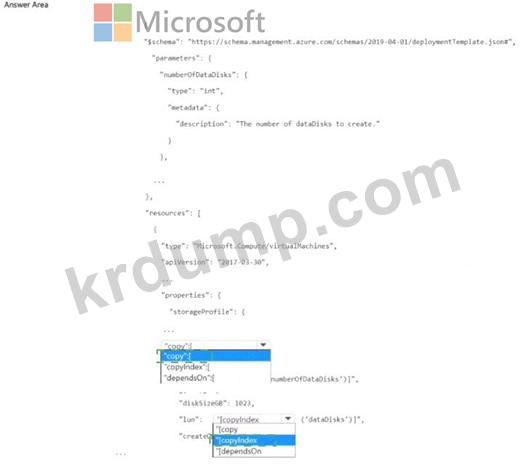
여러 개의 데이터 디스크가 있는 가상 머신을 만들려면 Azure Resource Manager(ARM) 템플릿을 사용해야 합니다.
템플릿을 어떻게 작성해야 하나요? 답변하려면 답변 영역에서 적절한 옵션을 선택하세요.
참고: 정답 하나당 1점입니다.
Explanation:
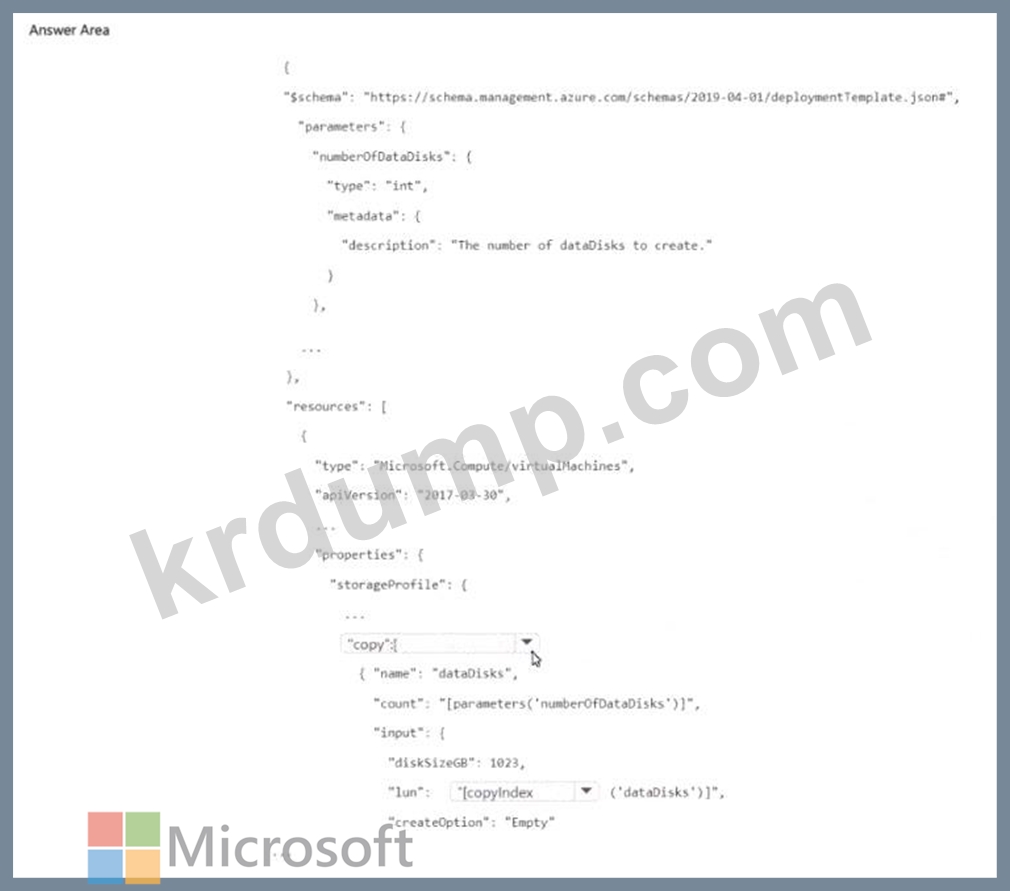
When using an Azure Resource Manager (ARM) template to deploy multiple identical resources-such as several data disks for a virtual machine-you use the copy loop construct within the resource definition.
1. The Purpose of the copy Element
The copy element in an ARM template enables you to create multiple instances of a property or resource based on a defined count.
According to the Azure Resource Manager Template Schema Documentation:
"Use the copy element to repeat a resource property or resource definition multiple times during deployment.
The copy loop works with the copyIndex() function to generate a unique index value for each iteration." Therefore, the first selection should be copy, as it defines the structure that will be repeated for each data disk.
Example syntax:
" dataDisks " : [
{
" copy " : {
" name " : " dataDisks " ,
" count " : " [parameters( ' numberOfDataDisks ' )] " ,
" input " : {
" lun " : " [copyIndex()] " ,
" createOption " : " Empty " ,
" diskSizeGB " : 1023
}
}
}
]
2. The copyIndex() Function
The copyIndex() function returns the current iteration number within a copy loop (starting at 0 by default).
This allows each created disk to be assigned a unique Logical Unit Number (LUN) or a distinctive name.
Microsoft documentation states:
"The copyIndex() function returns the iteration index of a resource copy loop, which is often used to generate unique names or configuration values for each resource instance." Thus, the second selection (used to define lun) should be copyIndex(), ensuring each disk has a unique LUN value.
How It Works Together:
The copy block iterates based on the numberOfDataDisks parameter.
The copyIndex() function assigns each disk a unique identifier within the loop.
This structure ensures dynamic, scalable deployment of data disks without manually defining each one.
# Final Verified Answer:
First Selection: copy
Second Selection: copyIndex()
Explanation Extracted from Microsoft Azure Administrator and ARM Template Documentation:
"The copy element repeats a property or resource in an ARM template."
"The copyIndex() function returns the index number of the iteration and can be used for unique naming or logical unit assignments." This combination (copy + copyIndex()) is the official and verified method for creating multiple data disks dynamically in an Azure virtual machine deployment using ARM templates.
- 다른 버전
- 7072Microsoft.AZ-104-KR.v2026-08-31.q361
- 1914Microsoft.AZ-104-KR.v2026-06-01.q197
- 2209Microsoft.AZ-104-KR.v2026-04-28.q180
- 2296Microsoft.AZ-104-KR.v2026-03-30.q206
- 3222Microsoft.AZ-104-KR.v2026-03-16.q335
- 2325Microsoft.AZ-104-KR.v2026-02-24.q208
- 3691Microsoft.AZ-104-KR.v2025-11-24.q191
- 3567Microsoft.AZ-104-KR.v2025-04-07.q159
- 7022Microsoft.AZ-104-KR.v2025-03-06.q323
- 4154Microsoft.AZ-104-KR.v2024-02-19.q160
- 2378Microsoft.AZ-104-KR.v2024-02-08.q139
- 2210Microsoft.AZ-104-KR.v2024-01-29.q113
- 1814Microsoft.AZ-104-KR.v2024-01-15.q130
- 최근 업로드
- 121ServSafe.ServSafe-Manager.v2026-09-10.q34
- 136Salesforce.Slack-Dev-201.v2026-09-10.q81
- 127Microsoft.DP-600.v2026-09-10.q105
- 171IAPP.CIPT.v2026-09-10.q179
- 189Cisco.500-420.v2026-09-09.q50
- 183WGU.Introduction-to-IT.v2026-09-09.q52
- 240GARP.2016-FRR.v2026-09-08.q268
- 147Oracle.1Z0-1051-26.v2026-09-08.q15
- 168DAMA.MD-1220.v2026-09-08.q48
- 152Saviynt.SCAIP.v2026-09-07.q20
PDF 파일 다운로드
메일 주소를 입력하시고 다운로드 하세요. Microsoft.AZ-104-KR.v2026-06-10.q199 모의시험 시험자료를 다운 받으세요.