설명:
드래그 앤 드롭 질문에 대한 정답은 다음과 같습니다.
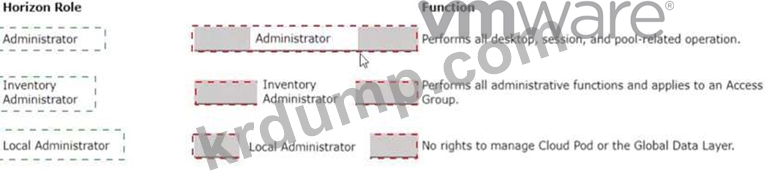
관리자 -> 모든 데스크톱, 세션 및 풀 관련 작업을 수행합니다.
인벤토리 관리자 -> 모든 관리 기능을 수행하고 액세스 그룹에 적용됩니다.
로컬 관리자 -> Cloud Pod 또는 글로벌 데이터 계층을 관리할 권한이 없습니다.
사전 정의된 관리자 역할(vmware.com)
Horizon 콘솔에 미리 정의된 관리자 역할은 Horizon 환경에 대해 다양한 수준의 액세스 및 제어를 제공하도록 설계되었습니다. 각 역할에는 특정 작업을 수행하거나 특정 정보를 볼 수 있는 권한을 부여하는 일련의 권한이 있습니다. 이러한 역할을 루트 액세스 그룹의 사용자 또는 그룹에 할당하여 시스템의 모든 인벤토리 개체에 대한 액세스 권한을 부여하거나 특정 액세스 그룹 또는 페더레이션 액세스 그룹에 할당하여 해당 그룹 내의 개체로 범위를 제한할 수 있습니다. 사전 정의된 역할을 수정할 수는 없지만 개별 권한을 선택하여 사용자 정의 역할을 생성할 수 있습니다.
The Administrator role is the most powerful role in Horizon console. It allows the user to perform all administrative operations, including creating and managing desktop pools, sessions, farms, applications, global settings, and other administrators. In a Cloud Pod Architecture environment, this role also enables the user to configure and manage a pod federation and manage remote pod sessions. The Administrator role on the root access group is equivalent to a super user role, as it gives full access to everything in the system. Therefore, you should assign this role to a limited number of users.
The Inventory Administrator role is similar to the Administrator role, but it applies only to an access group.
This means that the user can perform all administrative functions on the inventory objects that belong to that access group, such as desktop pools, farms, applications, and sessions. However, the user cannot manage global settings or other administrators. This role is useful for delegating administration of specific resources to different users or groups.
The Local Administrator role is a restricted version of the Inventory Administrator role. It applies only to an access group and does not grant any rights to manage Cloud Pod Architecture features or the Global Data Layer. This means that the user can only manage local inventory objects within that access group, such as desktop pools, farms, applications, and sessions. This role is suitable for administrators who do not need to access or modify global settings or cross-pod resources.
The Help Desk Administrator role is a specialized role that allows the user to perform desktop and application actions for troubleshooting and support purposes. These actions include shutting down, resetting, restarting, logging off, disconnecting, and sending messages to users' desktops or applications. The user can also perform remote assistance actions such as ending processes or viewing system information for a user's desktop or application. The user cannot create or modify any inventory objects or settings with this role.
References :
Some possible references are:
Predefined Administrator Roles
Assigning Administrator Roles
Understanding Roles and Privileges