

SC-300-KR 문제 116
User1이 Vault1에 저장된 인증서, 키 및 비밀의 메타데이터를 읽을 수 있도록 해야 합니다. 솔루션은 최소 권한 원칙을 따라야 합니다.
User1에게 어떤 역할을 할당해야 할까요?
Let's break this down step by step based on Azure Key Vault roles, permissions, and the principle of least privilege, as outlined in Microsoft Identity and Access Administrator documentation.
Understanding Azure Key Vault and the Requirement:
Azure Key Vault is a service that securely stores and manages cryptographic keys, secrets, and certificates. It uses role-based access control (RBAC) to manage permissions for users, groups, and applications.
The question requires that User1 canread the metadataof certificates, keys, and secrets in Vault1. In Azure Key Vault, "metadata" refers to the properties of these objects (e.g., name, creation date, expiration date), not the actual content (e.g., the secret value, key value, or certificate private key).
The solution must follow theprinciple of least privilege, meaning User1 should be granted the minimum permissions necessary to perform the task, without access to unnecessary actions (e.g., modifying or deleting objects).
Azure Key Vault RBAC Roles and Permissions:
Azure Key Vault supports built-in RBAC roles that define specific permissions for managing keys, secrets, and certificates. Let's examine each role in the options:
Key Vault Crypto User:
This role allows a user to perform cryptographic operations using keys (e.g., encrypt, decrypt, sign, verify) and to read key metadata.
Permissions include: Microsoft.KeyVault/vaults/keys/read (read key metadata) and cryptographicoperations like encrypt, decrypt, etc.
However, this role does not grant permissions to read metadata for secrets or certificates, and it includes cryptographic operation permissions, which are not needed for the task.
Key Vault Crypto Officer:
This role is designed for managing keys and performing cryptographic operations. It includes permissions to create, delete, update, and read keys, as well as perform cryptographic operations.
Permissions include: Microsoft.KeyVault/vaults/keys/* (full control over keys).
This role does not grant access to secrets or certificates and provides more permissions than needed (e.g., create, delete), violating the principle of least privilege.
Key Vault Reader:
This role provides read-only access to the metadata of all objects in the Key Vault (keys, secrets, and certificates).
Permissions include: Microsoft.KeyVault/vaults/read (read vault properties) and Microsoft.KeyVault/vaults/*
/read (read metadata for keys, secrets, and certificates).
Importantly, this role does not allow access to the actual content of the objects (e.g., the secret value, key value, or certificate private key), only the metadata. It also does not allow write operations (e.g., create, update, delete).
This aligns perfectly with the requirement to "read the metadata" and follows the principle of least privilege.
Key Vault Secrets User:
This role allows a user to read the content of secrets (not just metadata) and perform operations like getting the secret value.
Permissions include: Microsoft.KeyVault/vaults/secrets/get (read secret values) and Microsoft.KeyVault
/vaults/secrets/read (read secret metadata).
This role does not grant access to keys or certificates, and it provides more access than needed (reading the secret value, not just metadata), violating the principle of least privilege.
Applying the Principle of Least Privilege:
The task requires User1 to read the metadata of certificates, keys, and secrets, but not to access their content or perform any write operations.
Key Vault Readeris the most appropriate role because:
It grants read-only access to the metadata of all objects (keys, secrets, certificates).
It does not allow access to the content of the objects (e.g., secret values), which is not required.
It does not allow write operations (e.g., create, delete), adhering to the principle of least privilege.
The other roles either provide too much access (e.g., Key Vault Crypto Officer, Key Vault Secrets User) or do not cover all required objects (e.g., Key Vault Crypto User, Key Vault Secrets User).
Analysis of the Options:
A). Key Vault Crypto User:
Incorrect. This role only allows reading key metadata and performing cryptographic operations, but it does not provide access to secrets or certificates metadata. It also grants unnecessarycryptographic permissions.
B). Key Vault Crypto Officer:
Incorrect. This role provides full control over keys, which is far more than needed, and does not grant access to secrets or certificates metadata.
C). Key Vault Reader:
Correct. This role provides read-only access to the metadata of keys, secrets, and certificates, exactly matching the requirement while following the principle of least privilege.
D). Key Vault Secrets User:
Incorrect. This role allows reading secret values (not just metadata) and does not provide access to keys or certificates metadata. It grants more access than needed.
Additional Considerations:
If the question had asked for User1 to read the content of secrets (not just metadata), the Key Vault Secrets User role might be considered, but it still wouldn't cover keys and certificates.
Custom RBAC roles could be created to fine-tune permissions, but the question asks for a built-in role, and Key Vault Reader is the best fit.
The question does not specify whether User1 needs to perform other actions (e.g., cryptographic operations, managing the vault). If additional permissions were needed, a combination of roles or a custom role might be required, but the principle of least privilege guides us to the minimal role.
Conclusion:To ensure User1 can read the metadata of certificates, keys, and secrets in Vault1 while following the principle of least privilege, theKey Vault Readerrole should be assigned. This role provides the exact permissions needed without granting unnecessary access. Therefore, the correct answer isC.
References:
Azure Key Vault documentation: "Azure Key Vault RBAC roles" (Microsoft Learn:https://learn.microsoft.
com/en-us/azure/key-vault/general/rbac-guide)
Azure Key Vault documentation: "Secure access to a key vault" (Microsoft Learn:https://learn.microsoft.com
/en-us/azure/key-vault/general/secure-your-key-vault)
Microsoft Identity and Access Administrator (SC-300) exam study guide, which covers Azure Key Vault access control and the principle of least privilege.
SC-300-KR 문제 117
계약자는 [email protected]의 자격 증명을 사용합니다.
계약자에게 App1에 대한 액세스 권한을 제공할 수 있는지 확인해야 합니다. 계약자는 [email protected]으로 인증할 수 있어야 합니다.
어떻게 해야 할까요?
https://docs.microsoft.com/en-us/azure/active-directory/external-identities/b2b-quickstart-add-guest- usersportal
SC-300-KR 문제 118
Salesforce 앱에 액세스할 수 있는 게스트 사용자를 검토하는 프로세스를 구현해야 합니다. 검토는 다음 요구 사항을 충족해야 합니다.
* 검토는 매월 이루어져야 합니다.
* 각 게스트 사용자의 관리자는 액세스를 검토해야 합니다.
* 검토가 5일 이내에 완료되지 않으면 접근 권한이 제거됩니다.
* 게스트 사용자에게 관리자가 없는 경우, Megan Bowen이 액세스를 검토해야 합니다.
Explanation:
To implement a process for reviewing guest users' access to the Salesforce app with the specified requirements, you can use Microsoft Entra's Identity Governance access reviews feature. Here's a step-by- step guide:
Assign the appropriate role:
Ensure you have one of the following roles: Global Administrator, User Administrator, or Identity Governance Administrator1.
Navigate to Identity Governance:
Sign in to the Microsoft Entra admin center.
Go toIdentity governance>Access reviews1.
Create a new access review:
Select New access review.
Choose the Salesforce app to review guest user access1.
Configure the review settings:
Set the frequency of the review to monthly.
Define thedurationof the review period to5 days1.
Determine the reviewers:
Assign the manager of each guest user as the reviewer.
If a guest user does not have a manager, assignMegan Bowenas the reviewer1.
Automate the removal process:
Configure settings toautomatically remove accessif the review is not completed within the specified time frame1.
Monitor and enforce compliance:
Regularly check the access review results to ensure compliance with the review policy1.
Communicate the process:
Inform all stakeholders about the new review process and provide guidance on how to complete the reviews.
By following these steps, you can ensure that guest users' access to the Salesforce app is reviewed monthly, with managers being responsible for the review, and access is removed if the review is not completed in time.
SC-300-KR 문제 119
테넌트에는 다음 표에 표시된 사용자가 포함되어 있습니다.
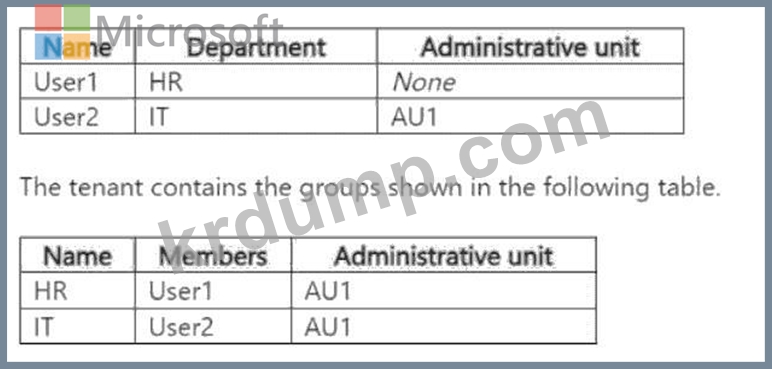
AU1의 경우 다음 구성을 업데이트합니다.
. 멤버십 유형: 동적 사용자
동적 멤버십 규칙: (user.department -eq "hr")
다음 각 문장에 대해, 문장이 사실이라면 '예'를 선택하세요. 그렇지 않으면 '아니요'를 선택하세요.
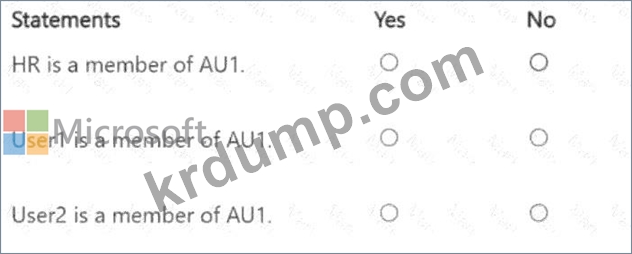

Explanation:
HR is a member of AU1: No
User1 is a member of AU1: Yes
User2 is a member of AU1: No
Let's break this down step by step based on Microsoft Entra ID dynamic membership rules, administrative units, and group membership, as outlined in Microsoft Identity and Access Administrator documentation.
Understanding Administrative Units and Dynamic Membership in Microsoft Entra ID:
Administrative Units (AUs):Administrative Units in Microsoft Entra ID are used to delegate administrative tasks to a subset of users, groups, or devices. They allow you to scope administrative roles (e.g., User Administrator) to specific users or groups within the AU.
Membership Types for AUs:
Assigned Membership:Members (users, groups, or devices) are manually added to the AU by an administrator.
Dynamic Membership:Members are automatically added or removed based on a dynamic membership rule, similar to dynamic groups. Dynamic membership for AUs can be applied to users or devices (but not groups directly).
The question states that AU1 is initially configured for assigned membership but is then updated to useDynamic Usermembership with the rule (user.department -eq "HR").
Dynamic Membership Rule:The rule (user.department -eq "HR") means that AU1 will automatically include all users whose department attribute in Microsoft Entra ID is set to "HR". This rule applies to users, not groups or devices, because the membership type is "Dynamic User." Impact of Changing AU1 to Dynamic Membership:
When AU1's membership type is changed from assigned to dynamic, the existing assigned memberships (e.
g., User2, HR group, IT group) are no longer relevant. Thedynamic rule takes over, and AU1's membership is determined solely by the rule (user.department -eq "HR").
Dynamic User Membership:Only users whose attributes match the rule will be members of AU1. Groups (like HR and IT) are not evaluated by this rule because the membership type is "Dynamic User," not "Dynamic Group." Let's evaluate the users based on the rule:
User1:Department = "HR". The rule (user.department -eq "HR") matches, so User1 will be dynamically added to AU1.
User2:Department = "IT". The rule does not match, so User2 will not be a member of AU1, even though they were previously assigned to AU1 and are a member of the IT group.
Groups (HR and IT):The dynamic membership rule for AU1 applies to users, not groups. Therefore, groups like HR and IT are not directly evaluated by the rule. However, we need toconsider whether group membership in AU1 affects the statements.
Statement 1: HR is a member of AU1:
Analysis:
The HR group is listed in the second table with AU1 as its administrative unit, indicating that it was initially assigned to AU1 when AU1 used assigned membership.
However, AU1's membership type has been updated to "Dynamic User" with the rule (user.department -eq
"HR"). Dynamic User membership applies to users, not groups.
In Microsoft Entra ID, administrative units with dynamic user membership do not include groups as members unless the AU's membership type is explicitly set to "Dynamic Group" (which is not the case here).
When AU1 was changed to dynamic membership, the HR group would no longer be considered a member of AU1 because the dynamic rule only evaluates users. Groups are not dynamically added to AUs based on user attributes.
Conclusion:The HR group is not a member of AU1 after the change to dynamic membership. Therefore, this statement isNo.
Statement 2: User1 is a member of AU1:
Analysis:
User1 has the department attribute set to "HR" (from the first table).
The dynamic membership rule for AU1 is (user.department -eq "HR"), which matches User1's department.
Therefore, User1 will be automatically added to AU1 as a member based on the dynamic rule.
Additionally, User1 is a member of the HR group, which was initially assigned to AU1. However, since AU1 now uses dynamic membership, the HR group's assignment to AU1 is irrelevant. User1's membership in AU1 is determined solely by the dynamic rule, not their group membership.
Conclusion:User1 is a member of AU1 because their department matches the dynamic rule. Therefore, this statement isYes.
Statement 3: User2 is a member of AU1:
Analysis:
User2 has the department attribute set to "IT" (from the first table).
The dynamic membership rule for AU1 is (user.department -eq "HR"), which does not match User2's department.
User2 was initially assigned to AU1 (as shown in the first table) and is a member of the IT group, which was also assigned to AU1. However, when AU1's membership type was changed to "Dynamic User," the assigned memberships (including User2 and the IT group) are no longer relevant.
The dynamic rule only includes users with the department "HR," so User2 is not added to AU1.
Conclusion:User2 is not a member of AU1 because their department does not match the dynamic rule.
Therefore, this statement isNo.
Additional Considerations:
If AU1's membership type were "Dynamic Group" instead of "Dynamic User," we would evaluate whether the HR and IT groups match a group-based rule. However, the question specifies "Dynamic User," so the rule applies to user attributes only.
The initial assigned memberships (e.g., User2, HR group, IT group) are overridden by the dynamic membership rule. Microsoft Entra ID does not retain assigned memberships when an AU or group is converted to dynamic membership.
The HR and IT groups being assigned to AU1 initially does not affect the dynamic membership of users, but it might be relevant for administrative scoping (e.g., if an admin role is scoped to AU1). However, the statements are about membership, not administrative roles.
Conclusion:Based on the dynamic membership rule (user.department -eq "HR") for AU1:
HR group:Not a member of AU1 because dynamic user membership does not apply to groups.
User1:A member of AU1 because their department is "HR," matching the rule.
User2:Not a member of AU1 because their department is "IT," which does not match the rule.Therefore, the answers are:
HR is a member of AU1:No
User1 is a member of AU1:Yes
User2 is a member of AU1:No
References:
Microsoft Entra ID documentation: "Dynamic membership rules for groups and administrative units" (Microsoft Learn:https://learn.microsoft.com/en-us/entra/identity/users/groups-dynamic-membership) Microsoft Entra ID documentation: "Manage administrative units" (Microsoft Learn:https://learn.microsoft.
com/en-us/entra/identity/role-based-access-control/administrative-units) Microsoft Identity and Access Administrator (SC-300) exam study guide, which covers dynamic membership rules and administrative units in Microsoft Entra ID.
SC-300-KR 문제 120
어떻게 해야 하나요?
A Datum Corporation is a consulting company in Montreal.
A Datum recently acquired a Vancouver-based company named Litware, Inc.
A Datum Environment
The on-premises network of A. Datum contains an Active Directory Domain Services (AD DS) forest named adatum.com.
A Datum has a Microsoft 365 E5 subscription. The subscription contains a verified domain that syncs with the adatum.com AD DS domain by using Azure AD Connect A Datum has an Azure Active Directory (Azure AD) tenant named adatum.com. The tenant has Security defaults disabled.
The tenant contains the users shown in the following table.
Problem Statements
A Datum identifies the following issues:
* Multiple users in the sales department have up to five devices. The sales department users report that sometimes they must contact the support department to join their devices to the Azure AD tenant because they have reached their device limit.
* A recent security incident reveals that several users leaked their credentials, a suspicious browser was used for a sign-in, and resources were accessed from an anonymous IP address,
* When you attempt to assign the Device Administrators role To IT_Group1, the group does NOT appear in the selection list.
* Anyone in the organization can invite guest users, including other guests and non-administrators.
* The helpdesk spends too much time resetting user passwords.
* Users currently use only passwords for authentication.
Requirements
A Datum plans to implement the following changes;
* Configure self-service password reset {SSPR}.
* Configure multi-factor authentication (MFA) for all users.
* Configure an access review for an access package named Package1.
* Require admin approval for application access to organizational data.
* Sync the AD DS users and groupsoflitware.com with the Azure AD tenant.
* Ensure that only users that are assigned specific admin roles can invite guest users.
* Increase the maximum number of devices that can be joined or registered to Azure AD to 10.
Technical Requirements
A Datum identifies the following technical requirements:
* Users assigned the User administrator role must be able to request permission to use the role when needed for up to one year.
* Users must be prompted to register for MFA and provided with an option to bypass the registration for a grace period.
* Users must provide one authentication method to reset their password by using SSPR. Available methods must include:
* Phone
* Security questions
* The Microsoft Authenticator app
* Trust relationships must NOT be established between the adatum.com and litware.com AD DS domains.
* The principle of least privilege must be used.
프리미엄 번들
DumpTop 에서 공유하는 최신 SC-300-KR 시험 덤프는 SC-300-KR 시험패스를 도와드릴수 있습니다! DumpTop 은 최근 업데이트된 SC-300-KR 시험자료를 제공해드립니다. DumpTop SC-300-KR 덤프도 시험문제 변경에 따라 업데이트되었으며 오답도 수정되었습니다. DumpTop SC-300-KR 덤프 최신버전을 공유받아보세요.
(480 Q&As 덤프, 30%OFF할인코드: KrDump)
- 다른 버전
- 288Microsoft.SC-300-KR.v2026-08-29.q204
- 1167Microsoft.SC-300-KR.v2026-06-08.q173
- 1280Microsoft.SC-300-KR.v2026-06-03.q151
- 1828Microsoft.SC-300-KR.v2026-04-21.q141
- 1406Microsoft.SC-300-KR.v2026-03-16.q211
- 1104Microsoft.SC-300-KR.v2026-03-03.q165
- 1131Microsoft.SC-300-KR.v2025-02-28.q117
- 최근 업로드
- 402Cisco.300-435.v2026-09-03.q259
- 228Oracle.1Z0-1045-26.v2026-09-03.q17
- 436IIA.IIA-CIA-Part1.v2026-09-03.q627
- 299Fortinet.NSE6_OTS_AR-7.6.v2026-09-03.q95
- 321Snowflake.DAA-C01.v2026-09-03.q67
- 3152Salesforce.AP-223.v2026-09-01.q94
- 2273Splunk.SPLK-5001.v2026-09-01.q60
- 3458Cisco.300-540.v2026-09-01.q62
- 4939Microsoft.MS-102-KR.v2026-09-01.q239
- 3232Microsoft.AI-900-KR.v2026-09-01.q162
PDF 파일 다운로드
메일 주소를 입력하시고 다운로드 하세요. Microsoft.SC-300-KR.v2025-11-24.q159 모의시험 시험자료를 다운 받으세요.