정답: B
Comprehensive and Detailed In-Depth Explanation:
Let's break this down step by step based on Microsoft Entra ID Conditional Access policies, the "Require multifactor authentication for Azure management" template, and the roles assigned to the users, as outlined in Microsoft Identity and Access Administrator documentation.
Understanding the "Require multifactor authentication for Azure management" Template:
Microsoft Entra ID Conditional Access policies allow administrators to enforce security controls, such as requiring multi-factor authentication (MFA), based on specific conditions.
The "Require multifactor authentication for Azure management" template is a predefined Conditional Access policy template in Microsoft Entra ID. This template is designed to secureaccess to Azure management interfaces, such as the Azure portal, Azure PowerShell, Azure CLI, and other Azure management endpoints.
Key Details of the Template:
Cloud Apps or Actions:The template targets the "Microsoft Azure Management" cloud app. This includes all Azure management interfaces but does not apply to other cloud apps (e.g., Microsoft 365 apps).
Users:By default, the template applies to "All users," but it can be modified to include or exclude specific users or groups. The question does not specify any modifications, so we assume the default "All users" scope.
Conditions:Typically, there are no specific conditions (e.g., device state, location) in this template unless modified.
Grant Controls:The template enforces "Require multi-factor authentication" as the access control.
Therefore, this policy will require MFA for any user who attempts to access Azure management interfaces.
Understanding the Roles and Their Interaction with Azure Management:
Let's examine the roles assigned to each user and whether they are likely to interact with Azure management interfaces:
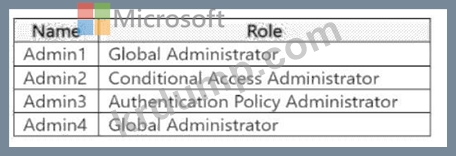
Admin1: Global Administrator
A Global Administrator has full access to all Microsoft Entra ID and Azure resources, including the ability to manage Azure subscriptions, resources, and the Azure portal.
Global Administrators frequently access Azure management interfaces (e.g., the Azure portal) to perform administrative tasks. Therefore, Admin1 will be subject to the Conditional Access policy when they sign in to access Azure management.
Admin2: Conditional Access Administrator
A Conditional Access Administrator can manage Conditional Access policies in Microsoft Entra ID but does not have direct access to Azure management interfaces by default.
This role is focused on Microsoft Entra ID, not Azure resource management. Unless Admin2 has been granted additional Azure roles (e.g., Contributor, Owner), they are unlikely to access Azure management interfaces.
The question does not indicate any additional roles for Admin2, so we assume they do not interact with Azure management.
Admin3: Authentication Policy Administrator
An Authentication Policy Administrator can manage authentication methods and policies in Microsoft Entra ID (e.g., MFA settings, passwordless authentication).
Like the Conditional Access Administrator, this role is specific to Microsoft Entra ID and does not grant access to Azure management interfaces by default. Admin3 would not typically access Azure management unless assigned additional Azure roles, which are not specified.
Admin4: Global Administrator
Like Admin1, Admin4 is a Global Administrator and has full access to Azure management interfaces.
Admin4 will be subject to the Conditional Access policy when accessing Azure management.
Applying the Conditional Access Policy:
The policy applies to "All users" (default scope of the template) and targets the "Microsoft Azure Management" cloud app.
The policy requires MFA for any user who accesses Azure management interfaces.
Admin1 and Admin4 (Global Administrators):
As Global Administrators, both Admin1 and Admin4 will access Azure management interfaces (e.g., the Azure portal) as part of their administrative duties.
The next time they sign in to access Azure management, the Conditional Access policy (Policy1) will enforce MFA.
Admin2 (Conditional Access Administrator) and Admin3 (Authentication Policy Administrator):
These roles do not inherently grant access to Azure management interfaces. Their responsibilities are limited to Microsoft Entra ID tasks, such as managing Conditional Access policies or authentication methods.
Unless Admin2 or Admin3 attempts to access Azure management (which they are not authorized to do by default), the policy will not apply to them. The question asks about the "next time they sign in," but the policy only triggers MFA when accessing the targeted cloud app (Microsoft Azure Management). If Admin2 and Admin3 sign in to Microsoft Entra ID or other apps (e.g., Microsoft 365), the policy does not apply.
Analysis of the Options:
A). Admin2 and Admin3 only:
Incorrect. Admin2 and Admin3 are not likely to access Azure management interfaces based on their roles, so the policy will not require MFA for them.
B). Admin1 and Admin4 only:
Correct. Admin1 and Admin4 are Global Administrators who will access Azure management interfaces, triggering the policy to require MFA the next time they sign in to those interfaces.
C). Admin1, Admin2, and Admin3 only:
Incorrect. Admin2 and Admin3 are not subject to the policy for the reasons stated above.
D). Admin1, Admin2, Admin3, and Admin4:
Incorrect. While the policy applies to "All users," only Admin1 and Admin4 (Global Administrators) are likely to access Azure management interfaces, triggering the MFA requirement.
Additional Considerations:
If Admin2 or Admin3 were assigned additional Azure roles (e.g., Contributor, Owner) that grant access to Azure management, they would also be subject to the policy. However, the question does not indicate any such roles.
The phrase "the next time they sign in" can be misleading. The policy only enforces MFA when the user signs in to the targeted cloud app (Microsoft Azure Management). IfAdmin2 or Admin3 signs in to a different app (e.g., Microsoft 365), the policy does not apply.
If the policy were modified to target a different cloud app (e.g., "All apps") or to include specific users, the answer might change. However, the question specifies the default template behavior.
Conclusion:The Conditional Access policy (Policy1) created using the "Require multifactor authentication for Azure management" template will require MFA for users who access Azure management interfaces. Based on their roles:
Admin1 and Admin4 (Global Administrators) will be required to use MFA the next time they sign in to Azure management.
Admin2 and Admin3 (Conditional Access Administrator and Authentication Policy Administrator) are not likely to access Azure management, so the policy does not apply to them.Therefore, the correct answer isB.
References:
Microsoft Entra ID Conditional Access documentation: "Common Conditional Access policies - Require MFA for Azure management" (Microsoft Learn:https://learn.microsoft.com/en-us/entra/identity/conditional- access/concept-conditional-access-policy-common#require-mfa-for-azure-management) Microsoft Entra ID role documentation: "Administrator role permissions in Microsoft Entra ID" (Microsoft Learn:https://learn.microsoft.com/en-us/entra/identity/role-based-access-control/permissions-reference) Microsoft Identity and Access Administrator (SC-300) exam study guide, which covers Conditional Access policies and their application to specific roles and cloud apps.