

MS-700 문제 146
Your company has a Microsoft 365 E5 subscription.
The company uses Microsoft Skype for Business Online and plans to upgrade to Microsoft Teams.
The network contains the following devices:
* 100 computers that run Windows 10
* 50 Android devices
* 50 iPhone devices
All the devices have the Skype for Business app installed.
You need to deploy Microsoft Teams to all the devices.
What should you do?
The company uses Microsoft Skype for Business Online and plans to upgrade to Microsoft Teams.
The network contains the following devices:
* 100 computers that run Windows 10
* 50 Android devices
* 50 iPhone devices
All the devices have the Skype for Business app installed.
You need to deploy Microsoft Teams to all the devices.
What should you do?
MS-700 문제 147
You have a Microsoft 365 subscription that contains a user named User1.
You have a custom policy named AppPolicy that has the following configurations:
Allow all apps published by Microsoft.
Allow only specified third-party apps.
Block all custom apps.
You need to assign AppPolicy to User1.
How should you complete the PowerShell command? To answer, select the appropriate options in the answer area.
NOTE: Each correct selection is worth one point.

You have a custom policy named AppPolicy that has the following configurations:
Allow all apps published by Microsoft.
Allow only specified third-party apps.
Block all custom apps.
You need to assign AppPolicy to User1.
How should you complete the PowerShell command? To answer, select the appropriate options in the answer area.
NOTE: Each correct selection is worth one point.

MS-700 문제 148
Your company has a Microsoft 365 subscription.
All users have computers that run Windows 10. The computers are joined to Azure Active Directory (Azure AD) and enrolled in Microsoft Intune. All the users are standard users.
The company plans to start using Microsoft Teams.
You need to deploy the Microsoft Teams client to the computers.
What should you use?
All users have computers that run Windows 10. The computers are joined to Azure Active Directory (Azure AD) and enrolled in Microsoft Intune. All the users are standard users.
The company plans to start using Microsoft Teams.
You need to deploy the Microsoft Teams client to the computers.
What should you use?
MS-700 문제 149
Your company has a Microsoft 365 subscription.
You need to prevent guest users from creating or updating channels.
How should you complete the PowerShell script? To answer, drag the appropriate options to the correct targets. Each option may be used once, more than once, or not at all. You may need to drag the split bar between panes or scroll to view content.
NOTE: Each correct selection is worth one point.
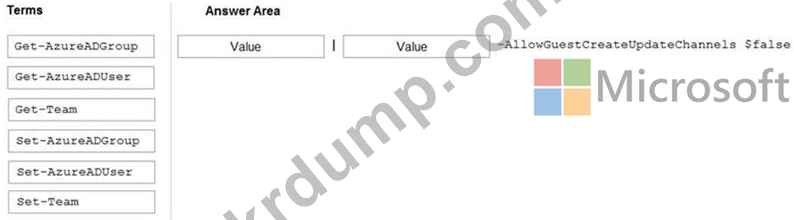
You need to prevent guest users from creating or updating channels.
How should you complete the PowerShell script? To answer, drag the appropriate options to the correct targets. Each option may be used once, more than once, or not at all. You may need to drag the split bar between panes or scroll to view content.
NOTE: Each correct selection is worth one point.

MS-700 문제 150
Note: This question is part of a series of questions that present the same scenario. Each question in the series contains a unique solution that might meet the stated goals. Some question sets might have more than one correct solution, while others might not have a correct solution.
After you answer a question in this section, you will NOT be able to return to it. As a result, these questions will not appear in the review screen.
Your company has a Microsoft 365 subscription that uses an Azure Active Directory (Azure AD) tenant named contoso.com.
You need to prevent guest users in the tenant from using cameras during Microsoft Teams meetings.
Solution: From the Azure Active Directory admin center, you modify the External collaboration settings.
Does this meet the goal?
After you answer a question in this section, you will NOT be able to return to it. As a result, these questions will not appear in the review screen.
Your company has a Microsoft 365 subscription that uses an Azure Active Directory (Azure AD) tenant named contoso.com.
You need to prevent guest users in the tenant from using cameras during Microsoft Teams meetings.
Solution: From the Azure Active Directory admin center, you modify the External collaboration settings.
Does this meet the goal?