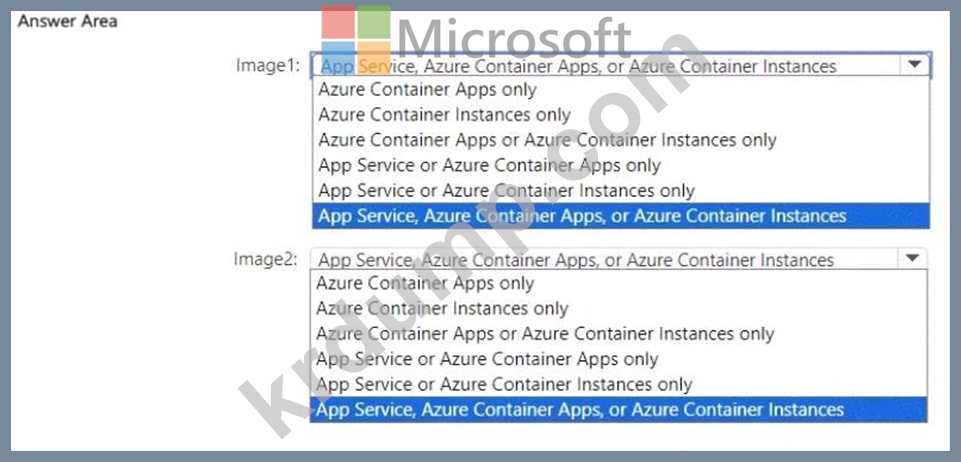
Explanation:

In Microsoft Azure, containerized application deployment can occur using multiple services, depending on the image type and operating system platform used. The question refers to two images - Image1 (Windows Server) and Image2 (Linux) - which are stored in an Azure Container Registry (ACR).
According to the Microsoft Azure Administrator Study Guide (AZ-104) and official Azure documentation, both Windows-based and Linux-based container images can be deployed using any of the following services, depending on the workload requirements:
* Azure App Service (Web App for Containers) - supports both Windows and Linux containers for web applications. It allows developers to directly deploy containerized applications from Docker Hub, Azure Container Registry, or a private registry.
* Azure Container Apps - serverless container hosting designed for microservices and event-driven architectures. It supports Linux and Windows containers, using Kubernetes behind the scenes, without requiring users to manage the cluster infrastructure.
* Azure Container Instances (ACI) - provides lightweight, serverless containers for quick deployment and isolated workloads. It supports both Windows and Linux images and can pull directly from Azure Container Registry.
Therefore, since both Image1 (Windows Server) and Image2 (Linux) are valid container images supported by the same three Azure container services, the correct and verified solution is to select "App Service, Azure Container Apps, or Azure Container Instances" for both.
This matches Azure documentation under:
* "Run containerized applications in Azure App Service"
* "Deploy containers using Azure Container Instances"
* "Build and deploy microservices using Azure Container Apps"
Each of these Azure services supports containerized deployments from ACR regardless of the underlying operating system image type.
Final Verified Answer:
# Image1: App Service, Azure Container Apps, or Azure Container Instances
# Image2: App Service, Azure Container Apps, or Azure Container Instances
Topic 2, Contoso LtdOverview
Contoso, Ltd. is a manufacturing company that has offices worldwide. Contoso works with partner organizations to bring products to market.
Contoso products are manufactured by using blueprint files that the company authors and maintains.
Existing Environment
Currently, Contoso uses multiple types of servers for business operations, including the following:
File servers
Domain controllers
Microsoft SQL Server servers
Your network contains an Active Directory forest named contoso.com. All servers and client computers are joined to Active Directory.
You have a public-facing application named App1. App1 is comprised of the following three tiers:
A SQL database
A web front end
A processing middle tier
Each tier is comprised of five virtual machines. Users access the web front end by using HTTPS only.
Requirements
Planned Changes
Contoso plans to implement the following changes to the infrastructure:
Move all the tiers of App1 to Azure.
Move the existing product blueprint files to Azure Blob storage.
Create a hybrid directory to support an upcoming Microsoft Office 365 migration project.
Technical Requirements
Contoso must meet the following technical requirements:
Move all the virtual machines for App1 to Azure.
Minimize the number of open ports between the App1 tiers.
Ensure that all the virtual machines for App1 are protected by backups.
Copy the blueprint files to Azure over the Internet.
Ensure that the blueprint files are stored in the archive storage tier.
Ensure that partner access to the blueprint files is secured and temporary.
Prevent user passwords or hashes of passwords from being stored in Azure.
Use unmanaged standard storage for the hard disks of the virtual machines.
Ensure that when users join devices to Azure Active Directory (Azure AD), the users use a mobile phone to verify their identity.
Minimize administrative effort whenever possible.
User Requirements
Contoso identifies the following requirements for users:
Ensure that only users who are part of a group named Pilot can join devices to Azure AD.
Designate a new user named Admin1 as the service administrator of the Azure subscription.
Admin1 must receive email alerts regarding service outages.
Ensure that a new user named User3 can create network objects for the Azure subscription.